Roles, permissions and invitations
Proto can audit who has access to what, create roles, restrict tables and invite people, once you allow it in Settings.
Before you start
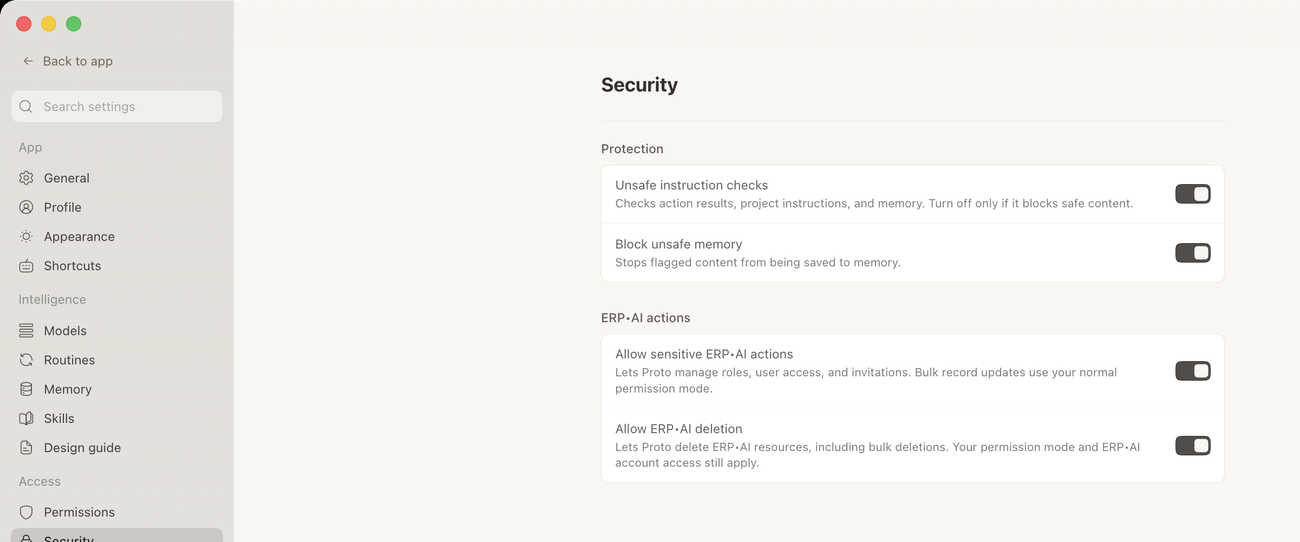
Proto can always read roles and access. To let it manage roles, user access or invitations, turn on Allow sensitive ERP•AI actions in Settings → Security. To let it delete things, also turn on Allow ERP•AI deletion. If a toggle is off, Proto tells you which one is missing.
Example requests
| Task | Example request |
|---|---|
| Audit access | “Who can edit the general ledger?” |
| Create a role | “Create a read-only role for auditors.” |
| Restrict a table | “Restrict the Salaries table to HR only.” |
| Invite people | “Invite the finance team to this app.” |
| Follow up on invites | “Resend the invitation to the two people who haven’t accepted.” |
| List pending invites | “List everyone who is still pending.” |