Proto interface tour
A quick guide to every part of the Proto window and what each one does.
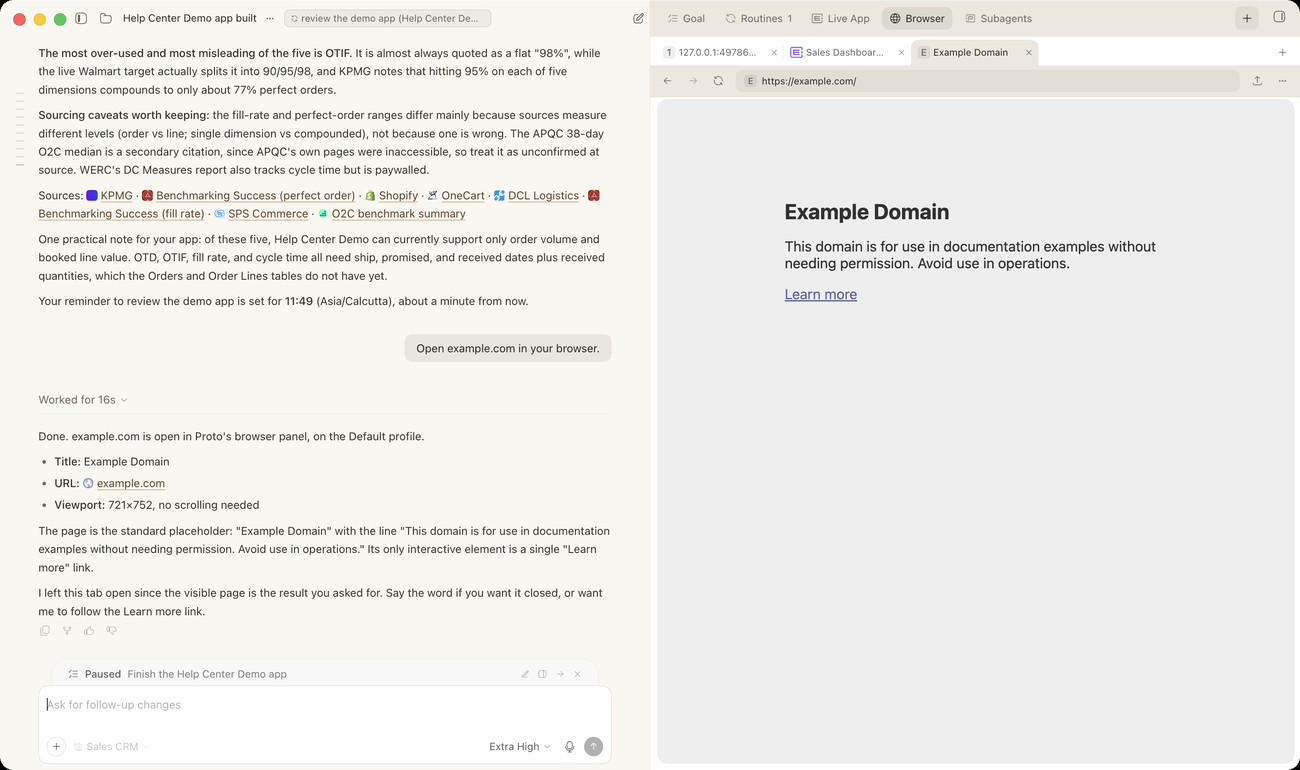
| Element | What it does |
|---|---|
| Composer | The message box at the bottom where you type requests, attach files and run slash commands. |
| Thread | The running conversation. Switch between Normal and Verbose transcript views in Settings. |
| Progress updates | Short status lines while a multi-step job runs. |
| Todo list | A live checklist of the current job’s steps: pending, in progress or completed. |
| Goal chip | Shows the thread’s goal and its status. Use its controls to edit, pause, resume or clear the goal. |
| Plan review card | Headed Review Plan. Shows Proto’s step-by-step plan with Implement plan and Request changes buttons. |
| Action approval card | Asks you to Approve or Reject a single action, such as a deletion or a message sent outside your organization. |
| Structured question card | A question with 2–4 options. The first option is the recommended default. |
| Follow-up buttons | One to three optional next steps under a finished answer. |
| Inline visuals | Charts, diagrams and interactive summaries shown directly in the chat. |
| Browser panel | Shows Proto’s built-in browser while it works on a website. |
| Side preview panel | A live preview of the ERP•AI app you are working on. Open it with /live-app. |
| Subagents panel | Shows work running in the background, with its status. |
| Routines panel | Lists the routines in this thread, or shows an empty state when there are none. |
| Side chat | Lets you ask a side question without disturbing the main thread. Open it with /sidechat. |
| Settings | Proto’s own settings. Open with ⌘ , (Ctrl + , on Windows and Linux) or /settings. |
Sidebar and composer controls
- Left sidebar: New task (⌘ N), Skills, Build·Host (your deployed sites), and Apps: pinned chats plus your chats grouped by ERP•AI app. Your profile is at the bottom.
- Above the composer: the workspace folder and the ERP•AI app Proto is working in. Click either to switch.
- In the composer: + to attach files, the model and effort picker (choose the model and how much effort it spends), and the microphone for voice typing.