Pricing, credits, and what things cost
ERP•AI uses simple, pay-as-you-go pricing:
- No base fee and no subscription. The $0 base account doesn’t need a card.
- Everyday use is free. Viewing, searching, and manual record work in the ERP•AI app don’t use credits. The per-call rates below apply to API and integration calls, imports, automations, and AI.
- Starting credit. Every new account gets $100 of credit once, valid for 1 month, so you can try metered features straight away.
- Users are free. There’s no per-user or per-seat charge: invite as many members as you need.
- At $0: you can still view, search, and edit your records by hand, and export your data (exports are billed at the export rate below, $1 per 100 exports). AI, imports, and workflows stop until you add credits.
- Prepaid credits pay for metered activity: API calls, imports, workflow runs, AI, and storage beyond what’s included.
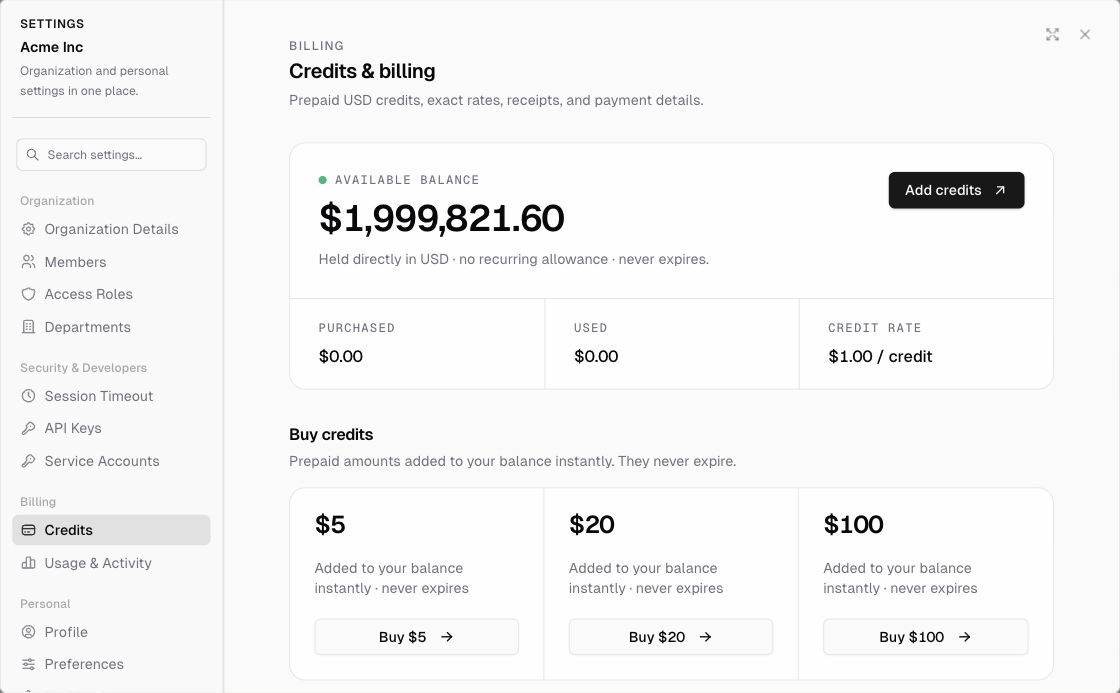
- Purchased credits never expire. They’re held in USD at a rate of $1.00 per credit.
Buy more credits
Settings → Credits (the page is titled Credits & billing), or Upgrade in the organization/app menu.
| Pack | Price | Notes |
|---|---|---|
| 5 credits | $5 | Added to your balance instantly, never expires |
| 20 credits | $20 | Added instantly, never expires |
| 100 credits | $100 | Added instantly, never expires |
| Enterprise | Custom | Volume pricing, invoicing, procurement, security reviews, and SLAs. Click Contact sales. |
- Go to Settings → Credits.
- Under Buy credits, click Buy $5, Buy $20, or Buy $100.
- Pay with a card. Add a payment method first if you don’t have one saved.
You can also set up an optional auto top-up using a saved payment method. Purchase history lists your credit purchases, with downloadable Stripe receipts.
What $1 buys (usage rates)
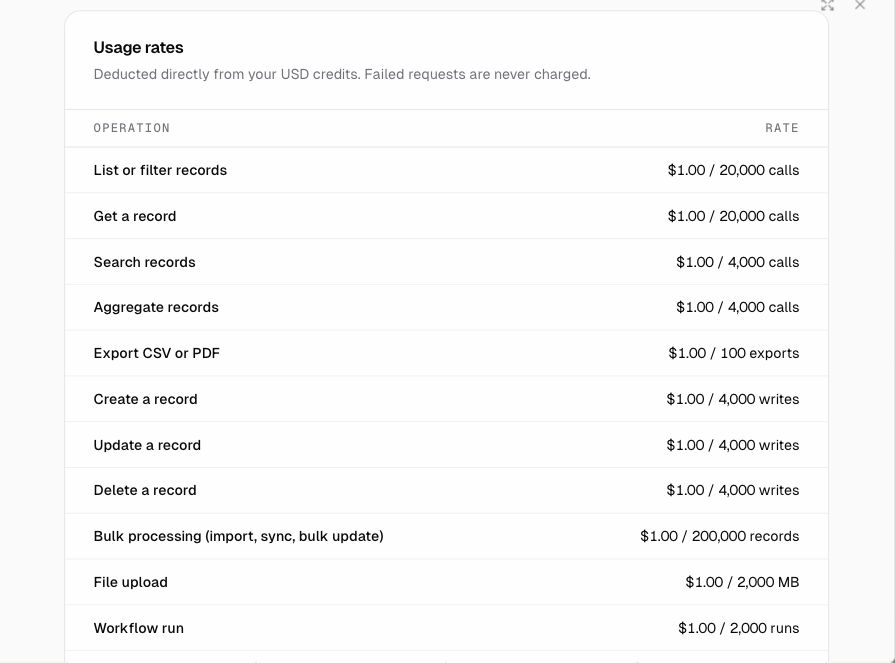
Charges are deducted directly from your USD credits. Failed requests are never charged.
| Operation | Rate |
|---|---|
| List or filter records | $1 / 20,000 calls |
| Get a record | $1 / 20,000 calls |
| Search records | $1 / 4,000 calls |
| Aggregate records | $1 / 4,000 calls |
| Export CSV or PDF | $1 / 100 exports |
| Create / update / delete a record | $1 / 4,000 writes |
| Bulk processing (import, sync, bulk update) | $1 / 200,000 records |
| File upload | $1 / 2,000 MB |
| Workflow run | $1 / 2,000 runs |
| Code-node compute (beyond included) | $1 / 12,000 CPU-seconds |
| Agent execution | $1 / 2,000 executions |
| Scheduled job or webhook | $1 / 20,000 activations |
Data retention (storage)
| Item | Included | Beyond included |
|---|---|---|
| Retained business records | 100,000 records | $1 per 100,000 record-months |
| Managed file retention | 100 MB | $2 per GB-month |
- Retention is settled daily (prorated).
- Archived and Trash records still count until they’re permanently purged.
- Shared file references count once. Independent copies and saved versions count separately.
- The Credits page shows your retained records, managed files, daily retention cost, and a 30-day reserve (the balance needed to cover the next 30 days of retention).
AI pricing
| Option | Cost |
|---|---|
| Managed AI models (for example ERP-1 Fast) | Model cost + 8% agent fee |
| ERP-1 Fast token prices | Cached input $0.05 / 1M tokens · Uncached input $0.25 / 1M tokens · Output $0.75 / 1M tokens |
| OpenRouter BYOK (bring your own key) | 8% agent fee only. OpenRouter bills you directly for the model |
| Your own ChatGPT (Codex) account | Connect it to Proto, and model usage goes to your ChatGPT plan |
Who can manage billing?
Anyone whose organization role includes Billing → View (credits, usage, invoices) or Billing → Buy (buy credits, change auto top-up and payment methods). The default Billing Admin and Super Admin roles have both. See Members and roles.