API Docs and External Apps
Every ERP•AI app can be used by other software, including scripts, integrations, websites, mobile apps, and AI agents, through a REST API. The Command Centre documents the API for you and helps you set safe limits on what outside software can access.
API Docs
Command Centre → API Docs
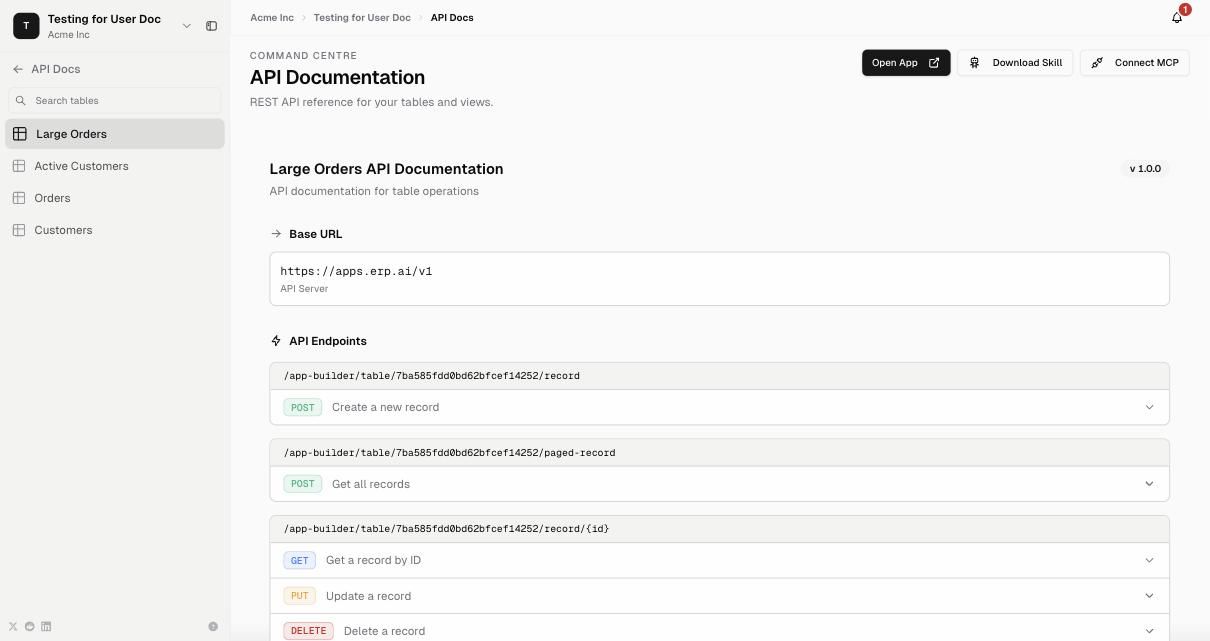
The left panel lists every table and view. Select one to see its API documentation:
Base URL:
https://apps.erp.ai/v1Endpoints for the selected table, for example:
Method Endpoint Purpose POST /app-builder/table/{tableId}/recordCreate a new record POST /app-builder/table/{tableId}/paged-recordGet records (with filters and paging) GET /app-builder/table/{tableId}/record/{id}Get a record by ID PUT /app-builder/table/{tableId}/record/{id}Update a record DELETE /app-builder/table/{tableId}/record/{id}Delete a record
Expand an endpoint to see its request and response format.
Buttons (top right)
- Download Skill: download a ready-made skill file that teaches an AI agent how to use this app’s API
- Connect MCP: connect an MCP-compatible AI client to the app
- Open App: return to the app
Authentication
Every request needs:
| Header | Value |
|---|---|
Authorization | Bearer <your API key> |
x-app-id | The app’s ID |
Content-Type | application/json (for POST/PUT) |
Create keys under Settings → API Keys. See API keys.
External Apps
Command Centre → External Apps
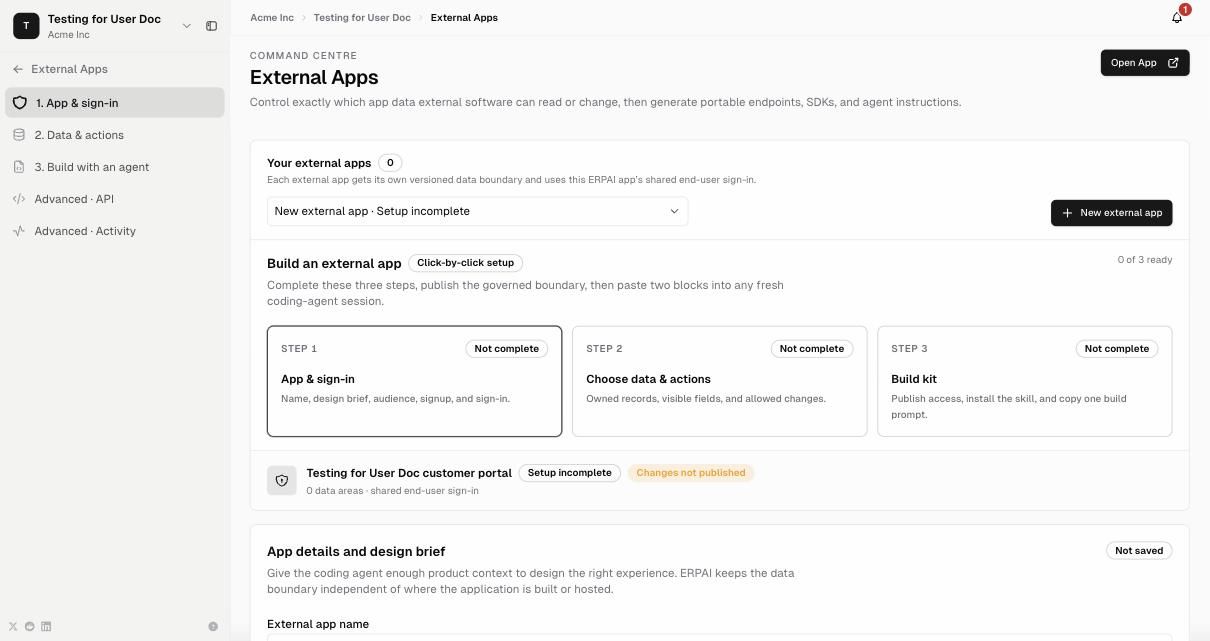
External Apps let you build separate applications, such as a customer portal, supplier portal, or mobile app, on top of your ERP•AI data without giving them full access. Each external app gets its own versioned data boundary and uses your ERP•AI app’s shared end-user sign-in.
Setup is three click-by-click steps:
| Step | What you set |
|---|---|
| 1. App & sign-in | External app name, design brief, audience, sign-up, and sign-in options |
| 2. Choose data & actions | Which records it owns, which fields are visible, and which changes it’s allowed to make |
| 3. Build kit | Publish access, install the skill, and copy one build prompt for your coding agent |
Once the boundary is published, paste the generated blocks into a coding-agent session to build the external app.
Advanced: API (lower-level access details) and Activity (what external apps have done).