Formula fields
A Formula field calculates its value from other fields on the same record, just like a spreadsheet formula. The result updates automatically whenever the inputs change, and users can’t edit it by hand.
Examples
Quantity * Unit Price→ Line totalIF(Status == "Closed", "Done", "Open")→ Simple labelADD_DAYS(Invoice Date, 30, "D")→ Due dateCONCATENATE(First Name, " ", Last Name)→ Full name
Create a Formula field
- Click + Column → Formula.
- Enter the Property name (for example
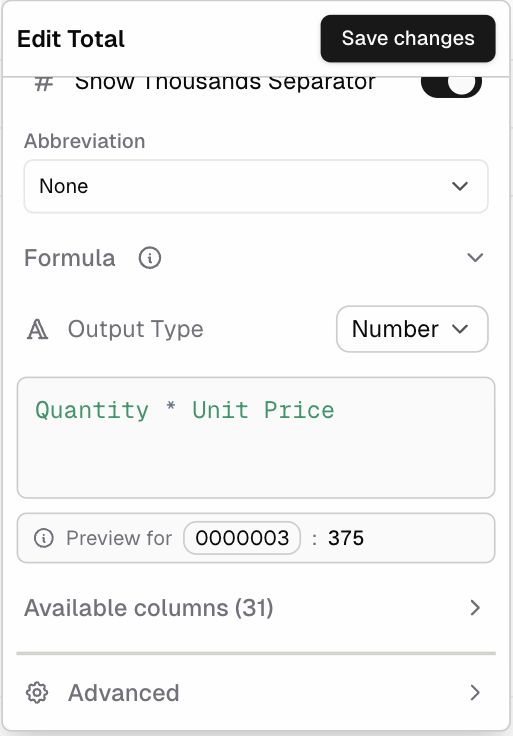
Total). - Under Formula, choose the Output Type: Text, Long Text, Number, Date, or Duration.
- When the output is Number, the Number formatting options appear (Is Currency, Integer/Decimal, Separator, Thousands Separator, Abbreviation).
- Type the formula in the editor, for example
Quantity * Unit Price.- Open Available columns and click a column to insert it. Column names are used as they are, including spaces (
Unit Price). - Available columns also lists related values, such as Created By → Email, and Current User values.
- Open Available columns and click a column to insert it. Column names are used as they are, including spaces (
- Check Preview for [Record…]: pick a record to see the result before saving.
- Click Save.
Formula syntax basics
| Element | Example | Notes |
|---|---|---|
| Column reference | Quantity, Unit Price | Type the column name exactly |
| Text | "Closed" | Put text in double or single quotes (both work) |
| Math | + - * / | Quantity * Unit Price * (1 - Discount) |
| Comparison | == != > < >= <= | Used inside IF and other logic functions (the in-app examples use == for “equals”) |
| Function | ROUND(Total, 2) | A large library of functions. See the function reference |
Getting help inside the editor
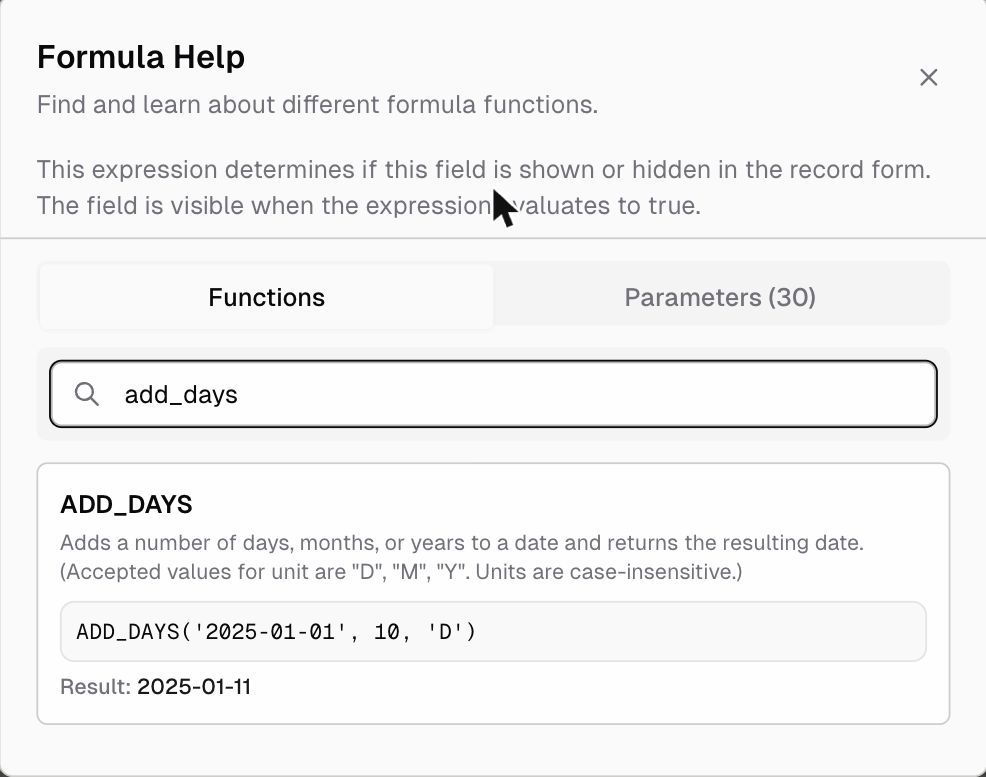
Click ƒx Functions in any expression editor to open Formula Help. It has two tabs:
- Functions: search every function and see its description, an example, and the result
- Parameters: the variables you can use in the current context, such as your columns and the current user’s details
Common recipes
| Goal | Formula | Output |
|---|---|---|
| Line amount | Quantity * Unit Price | Number |
| Line amount with discount | Quantity * Unit Price * (1 - Discount) | Number |
| Rounded total | ROUND(Quantity * Unit Price, 2) | Number |
| Due date 30 days after invoice | ADD_DAYS(Invoice Date, 30, "D") | Date |
| Days until due | DAYS(Due Date, TODAY()) | Number |
| Full name | CONCATENATE(First Name, " ", Last Name) | Text |
| Priority label | IF(Amount > 10000, "High", "Normal") | Text |
| Multi-level status | IFS(Score >= 80, "A", Score >= 60, "B", TRUE, "C") | Text |
| Upper-case code | UPPER(Code) | Text |
| Avoid errors | IFERROR(Revenue / Units, 0) | Number |
Tips and limits
- A formula uses fields from the same record. To total up child records use a Rollup. To copy a value from a linked record use Auto Fill.
- Choose the right Output Type so the result sorts, filters, and formats correctly.
- The same formula language is used in Field rules (Default Value, Display, and Validation) and in filter conditions that offer ƒx.