Basic field types
This article covers the field types you fill in directly: Text, Long Text, Number, Date, Select, Multi Select, Checkbox, Email, URL, Phone, File / Attachment, User, and Duration. All of them also have the common settings.
Text
A single line of text, such as a name, code, or reference number.
- Turn on Unique Records for values that must not repeat (SKU, employee code).
Long Text
Several lines of text, such as notes, descriptions, or terms and conditions.
Number
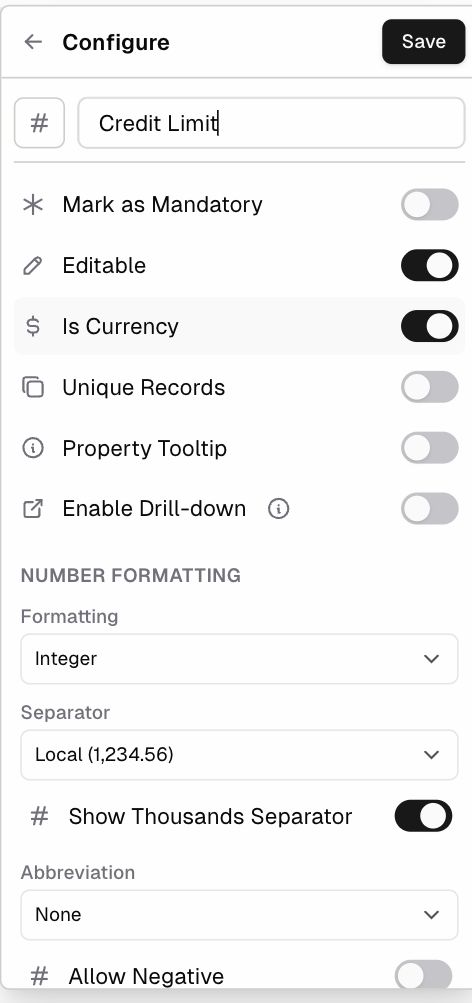
Quantities, prices, percentages, and scores.
| Option | Choices |
|---|---|
| Is Currency | Shows the value as money, using the app’s base currency |
| Formatting | Integer or Decimal |
| Precision(Decimal only) | None, 1 (1.0), 2 (1.00), 3 (1.000), 4 (1.0000) |
| Separator | Local (1,234.56), Comma-period (1,234.56), Period-comma (1.234,56), Space-comma (1 234,56), Space-period (1 234.56) |
| Show Thousands Separator | On or off |
| Abbreviation | None, Thousand (K), Million (M), Billion (B) |
| Allow Negative | Whether values below zero are allowed |
Date
- Display Time: turn it on to store and show a time as well as the date.
- The date format comes from App Settings → General → Date format, and times use the app’s Time zone.
Select
One value from a list of options. Each option has a color.
- The field starts with Option 1 and Option 2. Click an option to rename it, or click × to remove it.
- Type in Add an option… and press Enter or click Add. Separate several options with commas to add them all at once (
Lead, Active, Churned). - Drag the handle (⋮⋮) to reorder options.
Multi Select
Like Select, but a record can have several values (tags, skills).
Checkbox
A yes/no value (Approved, Paid, Active).
Stores and checks an email address. Workflows can use it to send emails.
URL
Stores a web link that users can click to open.
Phone
Stores a phone number.
File / Attachment
Upload files (PDFs, images, documents) to a record.
- Files are kept in ERP•AI storage by default. Admins can connect their own Amazon S3 bucket under App Settings → Data & Storage.
- 100 MB of managed file storage is included; storage beyond that is billed. See Pricing.
User
Assigns app users to a record (Owner, Account Manager, Assignee).
| Option | What it does |
|---|---|
| Allow Multiple Users | Lets you pick more than one user |
| Data Filter → + Add rule | Limits which users can be picked (for example only the Sales department) |
| Sort | The order users appear in the picker (Auto by default) |
Duration
A length of time (hours, minutes), for example time spent or time to resolve. Formula fields can also output a Duration.