Skip to main content Enter
Proto Workflows Headless SaaS
Enterprise
Enterprise Identity, access, deployment, and support controls for contracted environments. Version control Branches, releases, snapshots, and history in the per-app Command Centre.
Enterprise Talk to sales. Deployment, support, security, procurement and commercial terms. Contact sales
Pricing
Search apps — ⌘K / Ctrl K Sign Up
Proto Workflows Headless SaaS
Enterprise
Enterprise home Version control Contact sales
Pricing
Sign Up
  1. Home
  2. Help
  3. ERP•AI guide
  4. Workflows overview

Workflows overview

ERP•AI guide 2 min read Article 1 of 6 in Workflows (automation)

On this page

  1. The Workflows page
  2. Workflow templates
  3. How workflows run

Workflows (automation)

  1. Workflows overview
  2. Build your first workflow
  3. Triggers reference
  4. Nodes reference
  5. Workflow settings, runs, and troubleshooting
  6. Workflow failure alerts

Workflows (also called Proto Workflows) automate work in your app. A workflow starts with a trigger (something happens) and runs a chain of nodes (steps). Examples:

  • When an Order is created, email the account manager.
  • When a Leave Request is updated to Submitted, route it to the employee’s manager for approval.
  • Every morning at 8 AM, find overdue invoices and post a summary to Slack.
  • When a Stripe payment succeeds, create a Payment record and mark the invoice paid.
  • When a user clicks a custom action button, send the selected records to an outside API.

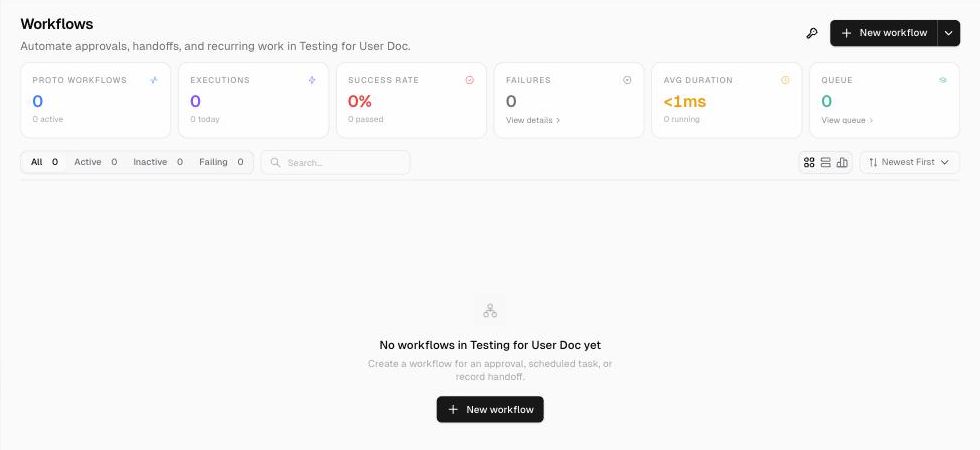
The Workflows page

In the app sidebar, click Automation → Workflows.

AreaWhat it shows
Summary cardsProto Workflows (total and active), Executions (with the count for the last 24 hours), Success Rate, Failures (with View details), Avg Duration, Queue (with View queue)
FiltersAll, Active, Inactive, Failing, plus a search box
Time range24h, 7d, 14d, 30d, or 90d for the summary cards (test runs are excluded)
DisplayCards, Table, or Analytics view, sorted by Newest First and other options
Connections (key icon)Opens App Settings → Connections to manage integration credentials
+ New workflow ▾Blank (start from scratch), From Template, or Create folder (group workflows into folders)
The Workflows page
The Workflows page

Workflow templates

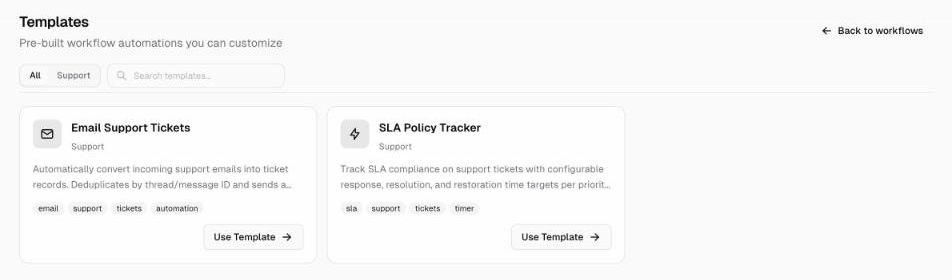
Click + New workflow ▾ → From Template to start from a ready-made automation, for example:

  • Email Support Tickets: turns incoming support emails into ticket records, removes duplicates by thread/message ID, and sends an acknowledgement
  • SLA Policy Tracker: tracks SLA compliance on support tickets with response, resolution, and restoration targets for each priority
Workflow templates
Workflow templates

Filter templates by category (for example Support) or search for one, then click Use Template.

How workflows run

  • A workflow runs only when it’s Active. New workflows start as Inactive.
  • Every run appears under Runs in the workflow editor. See Workflow settings and runs.
  • Workflow runs, code compute, agent executions, and trigger/webhook activations are billed from your credits. See Pricing.
PreviousDashboard Next Build your first workflow

Related articles

Build your first workflow In this example you’ll build a workflow that runs whenever a new Order is created and looks up the customer’s details.Triggers reference A trigger is the first node of every workflow. It decides when the workflow runs.Nodes reference Nodes are the steps of a workflow. Add one by clicking + after an existing node, then search or browse by category in the Add node panel.

Get help from the team.

In ERP•AI, open the organization or app menu and choose Report an issue. For deployment, billing or contract questions, write to the team.

Contact the team Open ERP•AI
ERP.AI

Business apps and Proto, a personal agent for your business.

Products

  • Business Apps
  • Proto
  • Workflows
  • Headless SaaS
  • Platform

Company

  • Company
  • Enterprise
  • Pricing
  • Contact
  • Partners

Resources

  • Resources
  • Documentation
  • Help Center
  • Security
  • Legal
  • Photo credits
© 2026 ERP•AI. All rights reserved. · Built with Proto
System status

Your Privacy, Your Choice

We use essential cookies to run the site and optional cookies for features, analytics, and relevant content. See Cookie policy

Manage Your Cookie Preferences

We use cookies to enhance your experience, analyze site traffic, and serve relevant content. By clicking "Accept All," you agree to our use of cookies. You can customize your preferences at any time.

Your browser's Global Privacy Control signal is honored: advertising cookies are off.

Learn more about how we use cookies

These cookies are required for the website to function properly. They ensure security, enable basic features like page navigation, and store user session data. You cannot disable these cookies.

These cookies enable additional features that enhance your experience, such as live chat, video playback, personalized content recommendations, and remembering user preferences.

These cookies help us understand how visitors interact with our site by collecting anonymous usage data. This allows us to measure performance, detect issues, and continuously improve the user experience.

These cookies allow us and advertising partners, including X, to deliver ads tailored to your interests. They track browsing habits across sites to provide relevant advertising and measure ad effectiveness.

Meet Proto.Free to use.

A personal agent for your business.

Brief Proto. It works across your files and tools, then brings the results back.

89.5% of attempts accepted on BusinessBench.

Download Proto

Also for macOS Windows Linux

Your own model provider may charge for usage.